Based on the IP address shown, this IP addresses is a client IP address which is set 192.168.1.10 as their IP. The network use between the server and client is 192.168.1.0 and the server IP address is 192.168.1.1. The function of this IP address is to connect between computer server and the client. Different client will get different IP address which is one computer will got one IP address. Usually this IP address will be set by the server. If the client IP addresses are same with other client, the network might be overlapping and could not connect to the server.
Saturday, 8 December 2012
semester 2 2012 week 7
hostname and domain setting
The domain name use in the zentyal is bmi.com. The purpose of this domain name is to choose the local domain associated with the server. if the external interface using DHCP has been configured, it may be filled automatically. Hostname will be automatically added as a host of this domain. The authentication domain for the users will also take this name. the additional domain can configure so the only one that will come pre-configured to provide all the information that the LAN client need for the network authentication protocol.
semester 2 2012 week 6
network interfaces setting
Through this network access, the configuration can access of each network card detected by the system and can select between a static configuration (manually configured), dynamic (DHCP configuration), VLAN (802.1Q) trunk, PPoE or bridged. In addition, each interface can define to be External if it is connected to an external network, such as the Internet. In order to apply stricter firewall policies, the interface is considered internal if the firewalls are not applied, connected to a local network. When an interface to serve DHCP is been configured, not only the IP address are been configured, but also the DNS servers and gateway. This is usual for hosts within the local network or for external interfaces connected to the ADSL routers. If the server is connected to one or more VLAN networks, the Trunk (802.11q) will be selected. Once selected, using this method many interfaces can be created associated to the defined tag, and consider them as if they were real interfaces. The VLAN network infrastructure is allows segmenting the local network to improve performance and security, without the need to invest in hardware that would usually be necessary to create each segment.
semester 2 2012 week 5
installing zentyal on laptop.
for this week, my advisor ask me to install the zentyal on my laptop. laptop is use to act like a server zentyal.
this is how to install zentyal:
The Zentyal installer is based on the Ubuntu Server installer. Those already familiar with this installer will also find the installation process very similar.
To start with, you choose the installation language, in this example English is chosen.

You can select any number of profiles to assign multiple roles to your Zentyal Server.
We can also install a manual set of services just clicking on their icons, without having to comply with any specific profile. Another possibility is to install a profile and then manually add the required extra packages.
We are going to develop the Infrastructure profile in this example. The wizards you will see during the installation depend on the packages you have selected to install in this step.
Once you have finished the selection, only the necessary additional packages will be installed. This selection is not definitive and later you can install and uninstall any of the Zentyal modules via the software management tools.
for this week, my advisor ask me to install the zentyal on my laptop. laptop is use to act like a server zentyal.
this is how to install zentyal:
The Zentyal installer is based on the Ubuntu Server installer. Those already familiar with this installer will also find the installation process very similar.
To start with, you choose the installation language, in this example English is chosen.
Selection of the language
You can install Zentyal by using the default mode which deletes
all disk contents and creates the partitions required by Zentyal by using LVM or you can choose the expert mode which allows
customised partitioning. Most users should choose the default option unless
they are installing on a server with RAID software or they want to create
special partitioning according to specific requirements.
Installer start
In the next step choose the language for your system interface. To
set the language, you are asked for your country, in this example the United
States is chosen.
Geographical location
You can use automatic detection for setting the keyboard: a few
questions are asked to ensure the model you are using is correct. Otherwise,
you can select the model manually by choosing No.
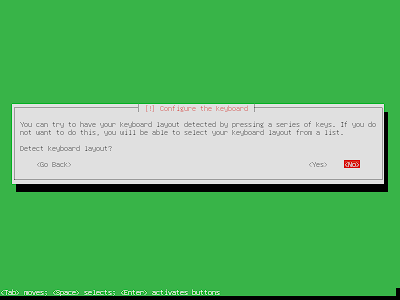
Keyboard configuration 1
Keyboard configuration 2
Keyboard configuration 3
If you have multiple network adapters, the installer will ask you
for your primary one , the one that will be used to access the Internet during
the installation. The installer will try to auto configure it using DHCP. If
you only have one interface, you will not see this question
Select primary network interface
Now choose a name for your server: this name is important for host
identification within the network. The DNS service will
automatically register this name. Samba will also use this
domain name, as you will see later.
Hostname
Next, the installer will ask you for the administrator account.
This user will have administration privileges and in addition, the same user
will be used to access the Zentyal interface.
System username
In the next step you are asked for the user password. It is
important to note that the user defined earlier, can access, using the same
password, both system (via SSH or local login) and the Zentyal web
interface. Therefore you must be really careful to choose a secure password
(more than 12 characters including letters, numbers and symbols).
Password
Here, insert the password again to verify it.
Confirm password
In the next step you are asked for your time zone. It is
automatically configured depending on the location chosen earlier, but you can
modify it in case this is incorrect.
Time zone
The installation progress bar will now appear. You must wait for
the basic system to install. This process can take approximately 20 minutes,
depending on the server.
Installation of the base system
Once installation of the base system is completed, you can eject
the installation CD and restart the server.
Restart
Now your Zentyal system is installed! A graphical interface in a
web browser is started and you are able to access the administrative interface.
The first boot will take an extra time while it configures core Zentyal
modules. After the first restart, the graphical environment was automatically
started, from now on you must authenticate before it begins.
Graphical environment with administrative
interface
To start configuring Zentyal profiles or modules, you must insert
the username and password indicated during the installation process. Any user
you add later to the sudo group can access the Zentyal
interface and has sudo privileges in the system.
You can select any number of profiles to assign multiple roles to your Zentyal Server.
We can also install a manual set of services just clicking on their icons, without having to comply with any specific profile. Another possibility is to install a profile and then manually add the required extra packages.
We are going to develop the Infrastructure profile in this example. The wizards you will see during the installation depend on the packages you have selected to install in this step.
Once you have finished the selection, only the necessary additional packages will be installed. This selection is not definitive and later you can install and uninstall any of the Zentyal modules via the software management tools.
Extra dependencies
The system will begin the installation process of required modules and you will be shown a progress bar, as well as some slides offering a brief introduction to core Zentyal functions and the commercial packages.
Keyboard configuration 1
Friday, 7 December 2012
semester 2 2012 week 3 - 4
operating system for the small office server appliance
the OS i use in the small office server appliance is zentyal.
what is zentyal??
Zentyal (formerly eBox Platform) is a Linux Small Business Server that can act as a Gateway, UTM, Office Server, Infrastructure Manager, Unified Communications Server or a combination of them. Zentyal offers an easy-to-use web interface to manage all your network services, from Internet access, network security, resource sharing, network infrastructure or communications.
Zentyal is the open source alternative to Windows Small Business Server and it is being widely used in the small and medium businesses regardless of sector, industry or location as well as in the public administrations or in the education sector. It is estimated that there are over 50,000 active Zentyal installations all over the globe. Zentyal Migration Tool for Windows Server is also available for download, making the migration process from existing Windows environments easier. Zentyal development is funded by eBox Technologies that offers commercial support and cloud-based services on top of Zentyal server
the OS i use in the small office server appliance is zentyal.
what is zentyal??
Zentyal (formerly eBox Platform) is a Linux Small Business Server that can act as a Gateway, UTM, Office Server, Infrastructure Manager, Unified Communications Server or a combination of them. Zentyal offers an easy-to-use web interface to manage all your network services, from Internet access, network security, resource sharing, network infrastructure or communications.
Zentyal is the open source alternative to Windows Small Business Server and it is being widely used in the small and medium businesses regardless of sector, industry or location as well as in the public administrations or in the education sector. It is estimated that there are over 50,000 active Zentyal installations all over the globe. Zentyal Migration Tool for Windows Server is also available for download, making the migration process from existing Windows environments easier. Zentyal development is funded by eBox Technologies that offers commercial support and cloud-based services on top of Zentyal server
semester 2 2012 week 1 - 2
on this week.. i do the research more about my project small office server appliance
what is server appliance??
A server appliance is a computer appliance that works as a server. It is designed so that the end-user does not need to understand the details of the operating system or the commands associated with it. Server appliance is a specialized server that is designed for ease of installation and maintenance. Server appliances have their hardware and software bundled in the product, so all applications are pre-installed.
The appliance is plugged into an existing network and can begin working almost immediately, with little configuration. It is designed to run with little or no support. It also can control all the equipment in the office such as printer, fax machine and computer. It can act like a fax server and print server. Server appliance can be integrated into an existing network's infrastructure. It is often used in situations where there is a lack of IT staff resource. This can include SME and branch networks where they may be no resource at all and corporate networks where use of an appliance can allow less qualified staff to help manage the network. The initial network or configuration may be entered through touch pad/push buttons on the front of the units via a serial/VGA console or is set by DHCP.
For further configuration or maintenance these devices usually offer access to the server appliance through an internal web server. These web servers may listen on a special port and not on the normal port 80 for security reasons.
semester 1 2012 week 14
guideline for the progress report
INTRODUCTION
It is a common practice in the industries, and generally in any project development
practice to have written progress report presented to the project advisor. Progress
report is meant to update the project supervisor on the status of the project such as the
problems encountered, the financial difficulties, the purchasing delay etc. Such
information is important to be discussed so that the dateline of the project will be met
ASSESSMENT CRITERIAS
SUBJECT: Progress Report: (title of project plus the period covered)
I. Introduction/Purpose
Purpose of the report: Very briefly explain the project.
Briefly explain what this progress report is for.
Time period covered for the Progress report.
II. Work completed during this time period. (dates)
Explain what you have accomplished. Provide details.
Project Staffing. How much effort has been used to date?
Project Deliverables. Have they met the quality targets set?
III. Work you need to complete before you finish the project.
What is the next step?
When do you expect to complete the next step?
What do you still need to do?
When do you expect to complete the project?
IV. Problems encountered
Explain any unexpected developments.
Explain what you plan to do to correct these problems.
State whether the project is on schedule.
If not, why not?
How do you plan to correct these problems?
When will you be back on schedule?
V. Conclusions
Subscribe to:
Posts (Atom)


