project proposal presentation session
on this week, all final year project semester 1 student will be assess by the assessor. during this session, the student needs to briefly explain detail about the project, how its work, contribution to other company and act. the student also need to convince to the assessor about the project that it can be done one 1 year period.
assessor name
mr razak(electrical section)
mr yusuf kadase (electronic section)
Friday, 7 December 2012

semester 1 2012 week 11-12
final presentation of slide show
a week before presentation,my supervisor wants to check my slide show whether its ok or not..
below is my slide show for presentation :




a week before presentation,my supervisor wants to check my slide show whether its ok or not..
below is my slide show for presentation :


semester 1 2012 week 10
Slideshow for presentation (draft)
For the following 2 week, my supervisor ask me to prepare the presentation slide because on week 13, there will be presentation session with the assessor. The criteria of the presentation slideshow will be shown below
Criteria
1.Slide Presentation
(demonstrate an adequate knowledge in the project development,clear purposes,logical sequence,fluency through the literature review)
2.Discuss literature review - (has anybody done this kind of project before)
1.Slide Presentation
(demonstrate an adequate knowledge in the project development,clear purposes,logical sequence,fluency through the literature review)
2.Discuss literature review - (has anybody done this kind of project before)
3.Explain the objective and methodology used in the project
4.Discuss the progress of the project
C Technical Questions.
There are 3 questions will ask in this section
semester 1 2012 week 7 - 9
for this week..i do the research of operating system use in the small office server appliance..
in the small office server i use the linux as the main os of the small office server appliance..
Linux
Linux is an increasingly popular operating
system that is proving to be a viable alternative to Microsoft’s Windows and
Apple’s Mac operating systems. Linux is open source, which means that it is
developed by a tight-knit community of developers and designed to be
permanently free of charge. Because of this, there are many different types of
Linux operating systems available to users. Linux is PC-UNIX in which the
kernel was created for PC/AT compatibles by Linus Torvalds of Finland. The name
is derived from the kernel’s creator
there are many types of linux which is;
RedHat Linux
Red Hat Linux, assembled by the
company Red Hat, was a popular Linux based operating system until its
discontinuation in 2004.
Red Hat Linux 1.0 was released on
November 3, 1994. It was originally called “Red Hat Commercial Linux”. It was
the first Linux distribution to use the RPM Package Manager as its packaging
format, and over time has served as the starting point for several other
distributions, such as Mandriva Linux and Yellow Dog Linux.
Red Hat Linux introduced a graphical
installer called Anaconda, intended to be easy to use for novices, and which
has since been adopted by some other Linux distributions. It also introduced a
built-in tool called Lokkit for configuring the firewall capabilities.
As of Red Hat Linux 8.0, UTF-8 was
enabled as the default character encoding for the system. This had little
effect on English-speaking users, but enabled much easier internationalisation
and seamless support for multiple languages, including ideographic,
bi-directional and complex script languages along with European languages.
Red Hat Linux lacked many features
due to possible copyright and patent problems. For example, MP3 support was
disabled in both Rhythmbox and XMMS; instead, Red Hat recommended using Ogg
Vorbis, which has no patents. MP3 support, however, could be installed
afterwards, although royalties are required everywhere MP3 is patented. Support
for Microsoft’s NTFS file system was also missing, but could be freely
installed as well.
Centos
CentOS is a community-supported,
free and open source operating system based on Red Hat Enterprise Linux. It
exists to provide a free enterprise class computing platform and strives to
maintain 100% binary compatibility with its upstream distribution. CentOS
stands for Community ENTerprise Operating System. CentOS developers use Red
Hat’s source code to create a final product very similar to Red Hat Enterprise
Linux. CentOS is available free of charge. Technical support is primarily
provided by the community via official mailing lists, web forums, and chat
rooms.
CentOS version numbers have two
parts, a major version and a minor version. The major and minor version numbers
respectively correspond to the major version and update set of Red Hat
Enterprise Linux from which the source packages used to build CentOS are taken.
For example, CentOS 4.4 is built from the source packages from Red Hat
Enterprise Linux 4 update 4.
Fedora
Fedora is another example of a Linux
distribution. In appearance, Fedora’s desktop and standard operations are
similar to those of Ubuntu and Kubuntu. Fedora is used primarily for older PCs
due to its limited system requirements. The term fedora was in use as early as
1891. The fedora came into use in about 1919. Fedoras can be found in nearly
any color imaginable, but black, grey, tan, brown, and red are the most
popular.
Ubuntu
The most popular and widely used
Linux distribution is called “Ubuntu.” Ubuntu is aimed at bringing Linux to
casual computer users and is
comparable in features to
Microsoft’s Windows operating system. Ubuntu is a computer operating system
based on the Debian Linux distribution. Ubuntu focuses on usability and
security. The Ubiquity installer allows Ubuntu to be installed to the hard disk
from within the Live CD environment, without the need for restarting the
computer prior to installation.
Ubuntu comes installed with a wide
range of software that includes OpenOffice, Firefox, Pidgin, Transmission,
GIMP, and several lightweight games (such as Sudoku and chess). Ubuntu allows
networking ports to be closed using its firewall, with customized port
selection available. It offers support for more than 46 languages. Ubuntu can
also run many programs designed for Microsoft Windows (such as Microsoft
Office), through Wine or using a Virtual Machine.
Kubuntu
Kubuntu is similar to Ubuntu in operation. The
main difference is that Kubuntu uses a different type of file system than
Ubuntu. They both perform the same basic functions, and both are easily
accessible to casual computer users
Debian
Debian is a more complicated version of the
Linux operating system. It is what the distributions Ubuntu and Kubuntu are
based on, though it is not nearly as accessible to casual computer users.
Debian has the ability to operate as a standard desktop computer operating
system, as well as an operating system used to run computer servers
Linux Mint
Linux Mint is a Linux distribution that was
modeled after Ubuntu. As opposed to Ubuntu, which has limited functionality
when first installed and requires users to pick and choose which applications
to install based on their needs, Linux Mint's focus is providing all programs
and drivers a user would need immediately after installation.
zentyal
Zentyal was developed with the aim of bringing Linux closer to SMBs and to allow them to
make the most of its potential as a corporate server. It is the open source
alternative to Microsoft network infrastructure products aimed at SMBs (Windows
Small Business Server, Windows Server, Microsoft Exchange, and Microsoft Forefront.)
and it is based on the popular Ubuntu distribution.
Zentyal allows IT professionals to manage all network services such as Internet
access, network security, resource sharing, network infrastructure or
communications in an easy way via one single platform.
|
semester 1 2012 week 6
i have reconstruct my own draft report and ready to submit to my supervisor..
The appliance is plugged into an existing network and can begin working almost immediately, with little configuration. It is designed to run with little or no support. It also can control all the equipment in the office such as printer, fax machine and computer. It can act like a fax server and print server. Server appliance can be integrated into an existing network's infrastructure. It is often used in situations where there is a lack of IT staff resource. This can include SME and branch networks where they may be no resource at all and corporate networks where use of an appliance can allow less qualified staff to help manage the network. The initial network or configuration may be entered through touch pad/push buttons on the front of the units via a serial/VGA console or is set by DHCP.
Project Statement
From this technology of server, small office server appliance can give security performance while using the internet and has a firewall itself. Server appliances are optimized for a small range of jobs, and they perform these jobs quite well. It is general-purpose networks boast a dozen monster quad-servers in a rack-mounted cluster weighing a thousand pounds, small and targeted appliances offer an elegant alternative in the right situation
literature review
There are a few software applications that act as a modem operation which is use in a server appliance is Linux software and Microsoft window. Linux is a Unix-like computer operating system assembled under the model of free and open source software development and distribution. Linux was originally developed as a free operating system for Intel x86-based personal computers. It has since been ported to more computer hardware platforms than any other operating system. It is a leading operating system on servers and other big iron systems such as mainframe computers and supercomputers more than 90% of today's top 500 supercomputers run some variant of Linux, including the 10 fastest. Linux also runs on embedded systems (devices where the operating system is typically built into the firm ware and highly tailored to the system) such as mobile phones, tablet computers, network routers, televisions and video game consoles. The Android system in wide use on mobile devices is built on the Linux kernel.
Webmin is a web based interface for system administration for UNIX. It is using any modern, Web browser which can setup user account, DNS, file sharing and much more. Webmin removes the need to manually edit Unix configuration files like /etc/password. It can manage a system from the console or remotely. The goal of any system administrator is to ensure that the various systems and servers are running smoothly, know how loaded (or overloaded) a system is and how effectively they are utilized (or overused). They keep it up-to-date with the latest patches and make sure that the Web pages that it displays are actually displaying.
For Applications Management along with Servers Management is to enables an IT administrator to identify whether a problem reported is caused by the underlying operating system or the application or a service. This will help make effective changes in the resources quickly and reduce application bottle-necks

From the block diagram, the server is act like a server appliance which is reducing or minimizing all the application such as file server, print server, web server, DNS, firewall to be control by one server. it can be built by using a wide range of hardware platform. All this application in the server is control in the hardware which is operating system zentyal. This hardware are the server which is computer with zentyal installing. It can connect to the client. The client can use all the application such as file sharing, web access, web mail, internet and web page only in the office itself.
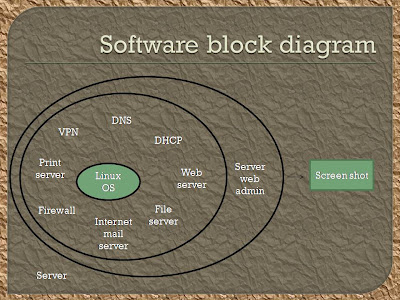
SOFTWARE BLOCK DIAGRAM

From the software block diagram, the linux OS which is zentyal is an operating system which use on the computer that enable application and computer operator to access the devices on the computer to perform desired functions. The zentyal linux OS control all the appliance which is internet mail server, DNS, DHCP, file sharing and firewall which is to be used by the client. The server web admin is the computer itself which are controlling the zentyal linux OS. The client will use the application on the server with a good performance and can do emailing, file sharing and anything else.
Better reliability, compatibility and performance of
the server appliance. It also provide better on system security focusing on
internet and preventing from the hacker which can secure the data or files.

INTRODUCTION
A server appliance is a computer appliance that works as a server. It is designed so that the end-user does not need to understand the details of the operating system or the commands associated with it. Server appliance is a specialized server that is designed for ease of installation and maintenance. Server appliances have their hardware and software bundled in the product, so all applications are pre-installed. The appliance is plugged into an existing network and can begin working almost immediately, with little configuration. It is designed to run with little or no support. It also can control all the equipment in the office such as printer, fax machine and computer. It can act like a fax server and print server. Server appliance can be integrated into an existing network's infrastructure. It is often used in situations where there is a lack of IT staff resource. This can include SME and branch networks where they may be no resource at all and corporate networks where use of an appliance can allow less qualified staff to help manage the network. The initial network or configuration may be entered through touch pad/push buttons on the front of the units via a serial/VGA console or is set by DHCP.
Project Statement
From this technology of server, small office server appliance can give security performance while using the internet and has a firewall itself. Server appliances are optimized for a small range of jobs, and they perform these jobs quite well. It is general-purpose networks boast a dozen monster quad-servers in a rack-mounted cluster weighing a thousand pounds, small and targeted appliances offer an elegant alternative in the right situation
literature review
There are a few software applications that act as a modem operation which is use in a server appliance is Linux software and Microsoft window. Linux is a Unix-like computer operating system assembled under the model of free and open source software development and distribution. Linux was originally developed as a free operating system for Intel x86-based personal computers. It has since been ported to more computer hardware platforms than any other operating system. It is a leading operating system on servers and other big iron systems such as mainframe computers and supercomputers more than 90% of today's top 500 supercomputers run some variant of Linux, including the 10 fastest. Linux also runs on embedded systems (devices where the operating system is typically built into the firm ware and highly tailored to the system) such as mobile phones, tablet computers, network routers, televisions and video game consoles. The Android system in wide use on mobile devices is built on the Linux kernel.
Webmin is a web based interface for system administration for UNIX. It is using any modern, Web browser which can setup user account, DNS, file sharing and much more. Webmin removes the need to manually edit Unix configuration files like /etc/password. It can manage a system from the console or remotely. The goal of any system administrator is to ensure that the various systems and servers are running smoothly, know how loaded (or overloaded) a system is and how effectively they are utilized (or overused). They keep it up-to-date with the latest patches and make sure that the Web pages that it displays are actually displaying.
For Applications Management along with Servers Management is to enables an IT administrator to identify whether a problem reported is caused by the underlying operating system or the application or a service. This will help make effective changes in the resources quickly and reduce application bottle-necks
METHODOLOGY
HARDWARE BLOCK DIAGRAM
HARDWARE BLOCK DIAGRAM

From the block diagram, the server is act like a server appliance which is reducing or minimizing all the application such as file server, print server, web server, DNS, firewall to be control by one server. it can be built by using a wide range of hardware platform. All this application in the server is control in the hardware which is operating system zentyal. This hardware are the server which is computer with zentyal installing. It can connect to the client. The client can use all the application such as file sharing, web access, web mail, internet and web page only in the office itself.
SOFTWARE BLOCK DIAGRAM

BENEFITS / CONTRIBUTIONS
Every project has their own
benefit and this project also has to which is:
- Easy
installation:
The operating system and application software are pre-installed on
the hardware, which reduces installation time and effort. To the extent possible,
the software is normally either pre-configured or self-configuring.
It should be noted that this is only a significant advantage for
applications that require minimal integration with existing infrastructure, and
minimal customization. Where such integration and customization is required, it
normally takes up the bulk of configuration time, so the savings from faster
initial setup is inconsequential.
- Fewer
skills required:
The simplified installation and configuration lead to scenarios
where fewer IT skills are required to implement the solution. This is
particularly true where the application is quite simple and requires little or
no further configuration beyond initial activation.
- Sole-source
technical support:
Any questions about hardware compatibility or operating system
patches are eliminated when a single vendor supports every "layer" of
the solution, starting with hardware and ending with the application software.
- High
performance specialized hardware:
In the case of specialized processing hardware, the additional and
overriding benefit is increased performance. Note that this is not generally
true for commodity hardware bundled as an appliance -- this advantage is only
relevant where the appliance incorporates specialized hardware, most often to
provide a specialized network infrastructure function
5. Better performance and security
Better reliability, compatibility and performance of
the server appliance. It also provide better on system security focusing on
internet and preventing from the hacker which can secure the data or files.
WORK PLAN

The
project time plan can be described as the term of work progress starting from
the first development until it finished. It also can define as time duration in
completed this project. It takes within 1 semester (4 month) to develop this
project and most of the task is complete in time schedule. The time to take for
this project is 12 month which is 2 semester. The project will begin on January
2012 and will be completed in December 2012. On the 1st semester are
focusing on the proposal and the project researches. The research will include
the entire project from the beginning to the end of the project.
CONCLUSION
As
the conclusion, Server appliances are typically
designed with ease of setup and installation in mind, and they should be simple
to maintain without requiring constant monitoring by IT professionals. It is designed to be plugged into the network and configured
loaded with files and begin working immediately with limited or no technical
support, at least for a power user or experienced network administrator. The
appliance may also include a RAID-based disk system and redundant power
supplies to provide an increased level of fault tolerance. The router is
often considered the first server appliance, because it plugs into the network
and performs the single function of packet forwarding. However, routers come in
many sizes and complexities, the larger ones requiring significant technical
expertise and detailed knowledge of the network such as internet appliance.
Internet
appliance also called as information appliance, smart appliance, and Web
appliance, it is a device specialized for accessing the Web and/or e-mail.
Designed for ease of use, it plugs into a telephone jack or LAN connection for
Internet hookup. Portable Internet appliances use a wireless connection to the
Internet. Devices for Internet TV services such as MSN TV are also sometimes
called Internet appliances. The term is rather encompassing, and innovative
products are expected all the time. Using linux software makes the server
appliance easier for the
inexperienced admin to set up a server. A server appliance has successfully met the requirement especially for a
small office.
semester 1 2012 week 5
for this week..my advisor has seen my draft report and he ask me to re do the report back because they are so many error in the report.
semester 1 2012 week 4
for this week 4..my supervisor ask me to do the draft report which is to see how my project work or design..
below is my draft of small office server appliance
abstract
A server appliance is a computer appliance that works as a server. It is designed so that the end-user does not need to understand the details of the operating system or the commands associated with it. Server appliance is a specialized server that is designed for ease of installation and maintenance. Server appliances have their hardware and software bundled in the product, so all applications are pre-installed.
The appliance is plugged into an existing network and can begin working almost immediately, with little configuration. It is designed to run with little or no support. It also can control all the equipment in the office such as printer, fax machine and computer. It can act like a fax server and print server. Server appliance can be integrated into an existing network's infrastructure. It is often used in situations where there is a lack of IT staff resource. This can include SME and branch networks where they may be no resource at all and corporate networks where use of an appliance can allow less qualified staff to help manage the network. The initial network or configuration may be entered through touch pad/push buttons on the front of the units via a serial/VGA console or is set by DHCP.
For further configuration or maintenance these devices usually offer access to the server appliance through an internal web server. These web servers may listen on a special port and not on the normal port 80 for security reasons.
This research review will elaborate more about the functioning of server appliance in the small office and how it work. From this technology of server, it can also give security performance while using the internet and has a firewall itself. Server appliances are optimized for a small range of jobs, and they perform these jobs quite well. It is general-purpose networks boast a dozen monster quad-servers in a rack-mounted cluster weighing a thousand pounds, small and targeted appliances offer an elegant alternative in the right situation.
INTRODUCTION
The objective of server appliance is to minimize the appliance in the office focus on small office with the less space. The entire appliance will control by the server. The benefit of using this server appliance is can reduce the space in the office. It also requires much less power than traditional servers. While a desktop PC requires about 200 watts, servers typically require a minimum of 300 watts. But even the most power-hungry appliances have a maximum electrical requirement of 60 watts. It also can act like a web server for itself.
Server appliances provide Internet sharing, FTP service, email, VPN connection, firewall services, print and file serving and also operate as a Web server. Access to the server appliance is through a Web browser. A server appliance can be integrated into existing networks in small enterprises or homes. It is not practical for large enterprises to utilize server appliances. It also includes:
- can shared internet access, sometime through integrated DSL modem- linux operating system (well hidden)
- Web server(apache) for administration and public or private web sites- web chasing service
- Email server (POP3, IMAP and SMTP)- ftp server
- File server for Windows, Mac and Unix clients- print server
- DNS server
- DHCP server to automatically configure workers for proper server and internet access
- Basic firewall security
- Network address translation to hide internal network address from the intenet
- VPN support to securely connect private networks across the intenet.
- Remote user authentication and connection support.
PROBLEM STATEMENT
Nowadays many small offices had a problem on their equipment such as computer, print, fax machine. They only had a minimal space for their equipment. If their workers are keep increasing every month, their equipment also increase. With the increasingly of this equipment will make a problem to the small office with a less space. . If the number of computers or internet subscribers is increasing, the compatible server to support the entire computer became critical. They should to buy many servers to make it stable. That does can make a waste of money in term of expenses. With this equipment are increases, the waste of electricity will be happen. These things are always happen every time either small company or big company. Another thing that happens is the security while using internet. It can make a waste of money and time to install the antivirus or the VPN to the entire computer. Servers are functions (Web, e-mail, FTP, file and print) as well as VPN and remote user support.
LITERATURE REVIEW
There are a few software applications that act as a modem operation which is use in a server appliance is Linux software and Microsoft window. Linux is a Unix-like computer operating system assembled under the model of free and open source software development and distribution. Linux was originally developed as a free operating system for Intel x86-based personal computers. It has since been ported to more computer hardware platforms than any other operating system. It is a leading operating system on servers and other big iron systems such as mainframe computers and supercomputers more than 90% of today's top 500 supercomputers run some variant of Linux, including the 10 fastest. Linux also runs on embedded systems (devices where the operating system is typically built into the firm ware and highly tailored to the system) such as mobile phones, tablet computers, network routers, televisions and video game consoles. The Android system in wide use on mobile devices is built on the Linux kernel.
Webmin is a web based interface for system administration for UNIX. It is using any modern, Web browser which can setup user account, DNS, file sharing and much more. Webmin removes the need to manually edit Unix configuration files like /etc/password. It can manage a system from the console or remotely. The goal of any system administrator is to ensure that the various systems and servers are running smoothly, know how loaded (or overloaded) a system is and how effectively they are utilized (or overused). They keep it up-to-date with the latest patches and make sure that the Web pages that it displays are actually displaying.
For Applications Management along with Servers Management is to enables an IT administrator to identify whether a problem reported is caused by the underlying operating system or the application or a service. This will help make effective changes in the resources quickly and reduce application bottle-necks
below is my draft of small office server appliance
abstract
A server appliance is a computer appliance that works as a server. It is designed so that the end-user does not need to understand the details of the operating system or the commands associated with it. Server appliance is a specialized server that is designed for ease of installation and maintenance. Server appliances have their hardware and software bundled in the product, so all applications are pre-installed.
The appliance is plugged into an existing network and can begin working almost immediately, with little configuration. It is designed to run with little or no support. It also can control all the equipment in the office such as printer, fax machine and computer. It can act like a fax server and print server. Server appliance can be integrated into an existing network's infrastructure. It is often used in situations where there is a lack of IT staff resource. This can include SME and branch networks where they may be no resource at all and corporate networks where use of an appliance can allow less qualified staff to help manage the network. The initial network or configuration may be entered through touch pad/push buttons on the front of the units via a serial/VGA console or is set by DHCP.
For further configuration or maintenance these devices usually offer access to the server appliance through an internal web server. These web servers may listen on a special port and not on the normal port 80 for security reasons.
This research review will elaborate more about the functioning of server appliance in the small office and how it work. From this technology of server, it can also give security performance while using the internet and has a firewall itself. Server appliances are optimized for a small range of jobs, and they perform these jobs quite well. It is general-purpose networks boast a dozen monster quad-servers in a rack-mounted cluster weighing a thousand pounds, small and targeted appliances offer an elegant alternative in the right situation.
INTRODUCTION
The objective of server appliance is to minimize the appliance in the office focus on small office with the less space. The entire appliance will control by the server. The benefit of using this server appliance is can reduce the space in the office. It also requires much less power than traditional servers. While a desktop PC requires about 200 watts, servers typically require a minimum of 300 watts. But even the most power-hungry appliances have a maximum electrical requirement of 60 watts. It also can act like a web server for itself.
Server appliances provide Internet sharing, FTP service, email, VPN connection, firewall services, print and file serving and also operate as a Web server. Access to the server appliance is through a Web browser. A server appliance can be integrated into existing networks in small enterprises or homes. It is not practical for large enterprises to utilize server appliances. It also includes:
- can shared internet access, sometime through integrated DSL modem- linux operating system (well hidden)
- Web server(apache) for administration and public or private web sites- web chasing service
- Email server (POP3, IMAP and SMTP)- ftp server
- File server for Windows, Mac and Unix clients- print server
- DNS server
- DHCP server to automatically configure workers for proper server and internet access
- Basic firewall security
- Network address translation to hide internal network address from the intenet
- VPN support to securely connect private networks across the intenet.
- Remote user authentication and connection support.
PROBLEM STATEMENT
Nowadays many small offices had a problem on their equipment such as computer, print, fax machine. They only had a minimal space for their equipment. If their workers are keep increasing every month, their equipment also increase. With the increasingly of this equipment will make a problem to the small office with a less space. . If the number of computers or internet subscribers is increasing, the compatible server to support the entire computer became critical. They should to buy many servers to make it stable. That does can make a waste of money in term of expenses. With this equipment are increases, the waste of electricity will be happen. These things are always happen every time either small company or big company. Another thing that happens is the security while using internet. It can make a waste of money and time to install the antivirus or the VPN to the entire computer. Servers are functions (Web, e-mail, FTP, file and print) as well as VPN and remote user support.
LITERATURE REVIEW
There are a few software applications that act as a modem operation which is use in a server appliance is Linux software and Microsoft window. Linux is a Unix-like computer operating system assembled under the model of free and open source software development and distribution. Linux was originally developed as a free operating system for Intel x86-based personal computers. It has since been ported to more computer hardware platforms than any other operating system. It is a leading operating system on servers and other big iron systems such as mainframe computers and supercomputers more than 90% of today's top 500 supercomputers run some variant of Linux, including the 10 fastest. Linux also runs on embedded systems (devices where the operating system is typically built into the firm ware and highly tailored to the system) such as mobile phones, tablet computers, network routers, televisions and video game consoles. The Android system in wide use on mobile devices is built on the Linux kernel.
Webmin is a web based interface for system administration for UNIX. It is using any modern, Web browser which can setup user account, DNS, file sharing and much more. Webmin removes the need to manually edit Unix configuration files like /etc/password. It can manage a system from the console or remotely. The goal of any system administrator is to ensure that the various systems and servers are running smoothly, know how loaded (or overloaded) a system is and how effectively they are utilized (or overused). They keep it up-to-date with the latest patches and make sure that the Web pages that it displays are actually displaying.
For Applications Management along with Servers Management is to enables an IT administrator to identify whether a problem reported is caused by the underlying operating system or the application or a service. This will help make effective changes in the resources quickly and reduce application bottle-necks
Subscribe to:
Posts (Atom)